
Termix
Self-hosted server management
English · 中文 · 日本語 · 한국어 · Français · Deutsch · Español · Português · Русский · العربية · हिन्दी · Türkçe · Tiếng Việt · Italiano



Achieved on September 1st, 2025
Self-hosted server management
English · 中文 · 日本語 · 한국어 · Français · Deutsch · Español · Português · Русский · العربية · हिन्दी · Türkçe · Tiếng Việt · Italiano
Achieved on September 1st, 2025
 Termix is an open-source, forever-free, self-hosted all-in-one server management platform. It provides a multi-platform solution for managing your servers and infrastructure through a single, intuitive interface. Termix offers SSH terminal access, remote desktop control (RDP, VNC, Telnet), SSH tunneling capabilities, remote SSH file management, and many other tools. Termix is the perfect free and self-hosted alternative to Termius available for all platforms.



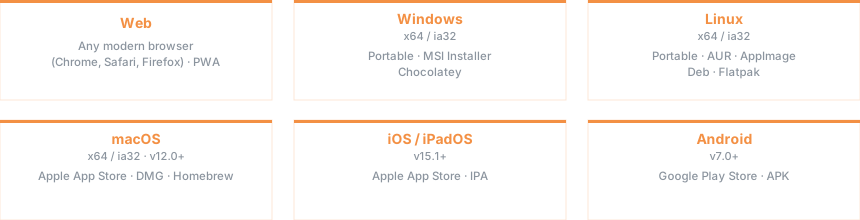
 Visit the [Termix Docs](https://docs.termix.site/install) for full installation instructions across all platforms.
Sample Docker Compose file (you can omit `guacd` and the network if you don't plan on using remote desktop features):
```yaml
services:
termix:
image: ghcr.io/lukegus/termix:latest
container_name: termix
restart: unless-stopped
ports:
- "8080:8080"
volumes:
- termix-data:/app/data
environment:
PORT: "8080"
depends_on:
- guacd
networks:
- termix-net
guacd:
image: guacamole/guacd:1.6.0
container_name: guacd
restart: unless-stopped
ports:
- "4822:4822"
networks:
- termix-net
volumes:
termix-data:
driver: local
networks:
termix-net:
driver: bridge
```
Visit the [Termix Docs](https://docs.termix.site/install) for full installation instructions across all platforms.
Sample Docker Compose file (you can omit `guacd` and the network if you don't plan on using remote desktop features):
```yaml
services:
termix:
image: ghcr.io/lukegus/termix:latest
container_name: termix
restart: unless-stopped
ports:
- "8080:8080"
volumes:
- termix-data:/app/data
environment:
PORT: "8080"
depends_on:
- guacd
networks:
- termix-net
guacd:
image: guacamole/guacd:1.6.0
container_name: guacd
restart: unless-stopped
ports:
- "4822:4822"
networks:
- termix-net
volumes:
termix-data:
driver: local
networks:
termix-net:
driver: bridge
```

 |
 |
 |
 |
 |
 |
 |
 |
 |
 |
 |
 |
 See [Projects](https://github.com/orgs/Termix-SSH/projects/2) for all planned features. If you are looking to contribute, see [Contributing](https://github.com/Termix-SSH/Termix/blob/main/CONTRIBUTING.md).







 If you need help or want to request a feature with Termix, visit the [Issues](https://github.com/Termix-SSH/Support/issues) page, log in, and press `New Issue`. Please be as detailed as possible in your issue, preferably written in English. You can also join the [Discord](https://discord.gg/jVQGdvHDrf) server and visit the support channel, however, response times may be longer.
 Distributed under the Apache License Version 2.0. See `LICENSE` for more information.